When you're building a successful website, there are a lot of bases to cover. Maybe you've already written search-friendly copy, designed a clean layout and researched your audience. Those are all the right moves. But one small detail is easy to overlook: your URLs, the web addresses for each page of your site.
"Does anyone really look at those?" More than you'd think. URLs show up when people share your links in texts, emails and social posts, and they often appear in search results too. A clean URL looks trustworthy. A long string of random numbers and symbols can look spammy and make people hesitate to click.
Compare these two:
yourstudio.com/services/wedding-florals
yourstudio.com/page?id=4827&ref=x91_b&sess=a7f3
You know exactly where the first one goes. The second one could be anything.
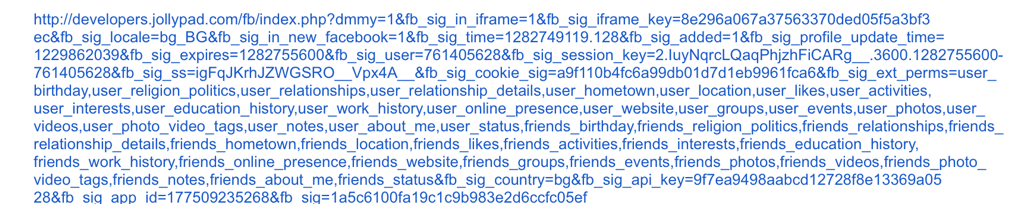
Would you feel safe clicking on the above train wreck of a URL?
A well-structured URL also helps search engines understand what a page is about and how it fits into the rest of your site. On mobile, Google often shows your site name and a short breadcrumb path (like Your Studio › Services › Wedding Florals) instead of the full address, so a clear structure makes your listing look better too.
Here are five best practices to keep your URLs working for you.
1. Keep it short and descriptive
A URL should be as brief as possible while still telling people what's on the page. Google's own URL structure guidelines recommend using readable words rather than long ID numbers.
Say you're shopping for socks and see these two results:
happysocks.com/us/men/mens-socks/
amazon.com/Socks-Men-Clothing/b?ie=UTF8&node=1045708
The first has a simple structure that tells you exactly where you are on the site. The second is harder to read at a glance. Both are big brands people already trust. For a small business that people don't know yet, a clean, readable URL matters even more.
Try this: Organize your site so URLs follow a logical path, like /services/wedding-planning or /portfolio/kitchen-remodel.
2. Use your keywords, naturally
Include the words your clients actually search for. If you're a florist in Richmond, /wedding-flowers-richmond tells both people and search engines what to expect.
Keywords in a URL won't rocket you to the top of Google by themselves. Great content does most of that work. But they help people decide to click, and they make shared links instantly understandable.
Just don't overdo it. /wedding-flowers-best-wedding-flowers-cheap-wedding-flowers looks spammy and helps no one. One clear phrase is plenty.

3. Use hyphens, not underscores
Google specifically recommends hyphens instead of underscores to separate words. Hyphens clearly mark where one word ends and the next begins, for both people and search engines. Underscores are commonly used to join words together, as in computer code, and they're easy to miss when a link is underlined.
Good: /fun-novelty-socks
Avoid: /fun_novelty_socks
Avoid: /funnoveltysocks
4. Stick to lowercase
URLs can be case sensitive, which means /About and /about may be treated as two different pages. Use lowercase letters everywhere to avoid broken links and duplicate pages.
5. Cut the clutter
Remove anything that doesn't change what's on the page: dates you'll later regret, filler words like "and" or "the" where they're not needed, and tracking codes or session IDs. Shorter is easier to read, share and remember.
A blog post URL like /blog/2021/03/15/our-top-10-tips-for-planning-the-perfect-wedding can simply be /blog/wedding-planning-tips. It's cleaner, and it won't look outdated next year.
Before you change existing URLs: set up redirects
If your current URLs are messy, it's tempting to clean them all up at once. Just be careful. Changing a URL breaks every link pointing to the old one: links in search results, social posts, directories and other websites.
The fix is a 301 redirect, which permanently sends visitors and search engines from the old address to the new one. On Squarespace, you can set these up under Settings › Developer Tools › URL Mappings using the format /old-page -> /new-page 301. Most other website platforms offer something similar.
Tip: Focus on getting URLs right for new pages and posts. Only change older ones if they're truly confusing, and always add a redirect when you do.
Small details, big impression
Your URLs are a tiny part of your website, but they're part of every first impression. Clear, simple web addresses tell people your business is organized, trustworthy and easy to work with, which is exactly what a strong brand should say.
Want a website and brand that make a great first impression? Book a free discovery call and let's talk about your business.